
doe
A gentle PDF editor for Windows. Mark up, rewrite and reorganise PDFs, and everything stays on your computer.

Everything you need to do to a PDF, nothing you don't.
Mark up any PDF
Add text, draw with a pen, highlight, draw boxes, white-out, insert images and place a drawn signature.
Edit what's already there
doe finds the existing text, images and shapes. Click one to move or restyle it, double-click to rewrite, or delete it.
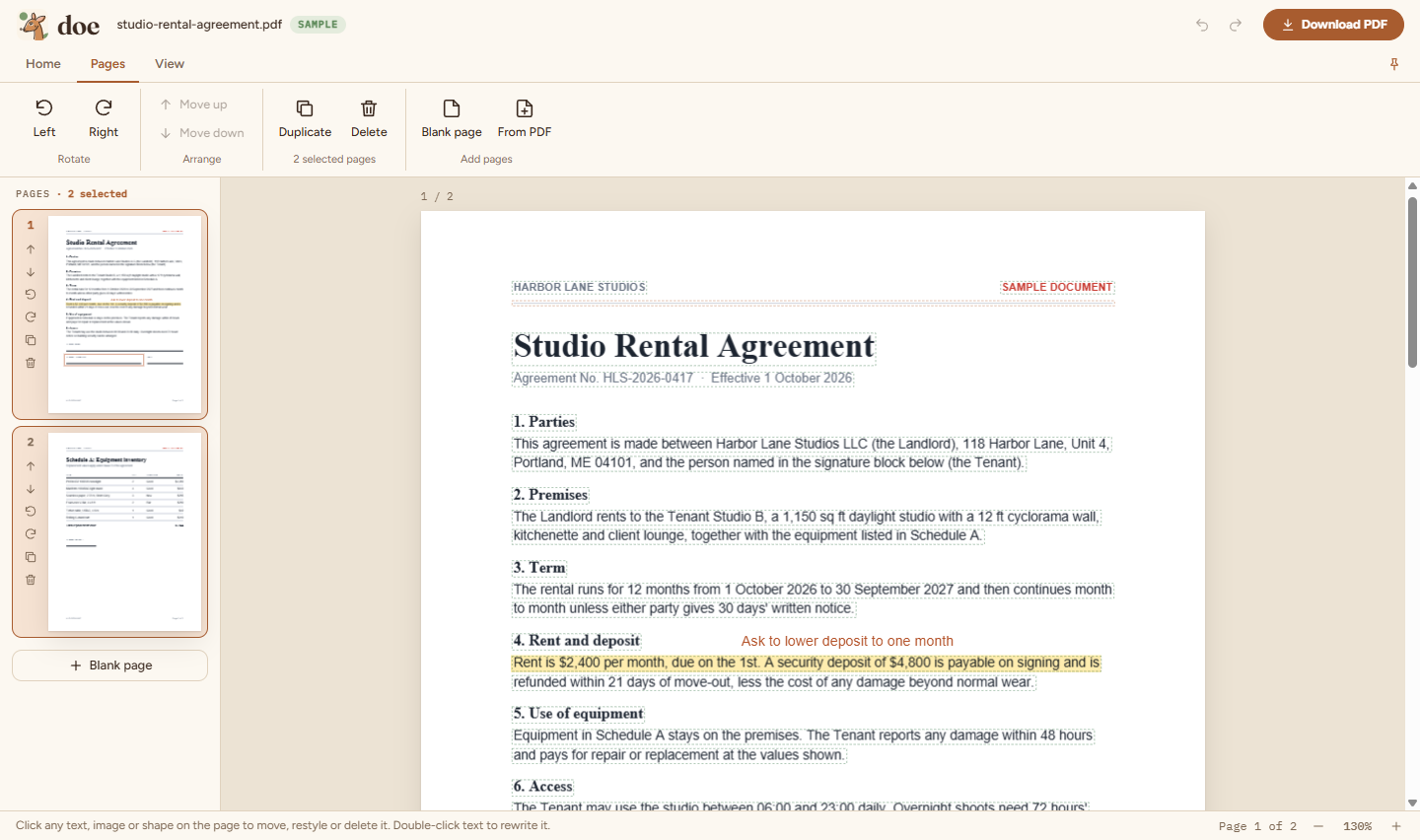
Reorganise pages
Select several pages, then rotate, move, duplicate or delete them together. Drag to reorder and merge in other PDFs.
Private, calm and quick.
- Private by design. PDFs are opened and edited on your PC and never uploaded. Only sign-in talks to our server.
- Works offline. After signing in, doe keeps working for up to 14 days without internet.
- No passwords. Sign in with your email and a 6-digit code.
- Fast on scans. Copier scans open smoothly, without freezing.
- Light and dark themes, a ribbon you can pin or hide, and undo for everything.
Try doe free for 30 days.
No card needed. One account works on up to 3 PCs.
Windows may show "Windows protected your PC" because the installer isn't code-signed yet. Click More info, then Run anyway.
After installing, open doe and sign in with your email. Your 30-day free trial starts automatically.
- Version
- 1.0.0
- Size
- 107 MB
- Requires
- Windows 10 or 11, 64-bit
- IT teams
- MSI installer (120 MB), installs for all users via Intune, SCCM or Group Policy
Verify your download (SHA-256)
.exe 53ea0adafd9f9a934dacd7d9a48ed589747829c01e5b4a71c5b5f53527ecc88a
.msi c64dd4c9c2c3c7832df1f4b0ce6f219d2e7911a623f49cf062ae78785c361790
Good to know
- Deleting or rewriting existing content covers it; the original stays in the file underneath. doe isn't a redaction tool.
- Rewritten text uses standard fonts (Helvetica, Times or Courier) and Latin characters.
- doe is Windows only for now.